Demo

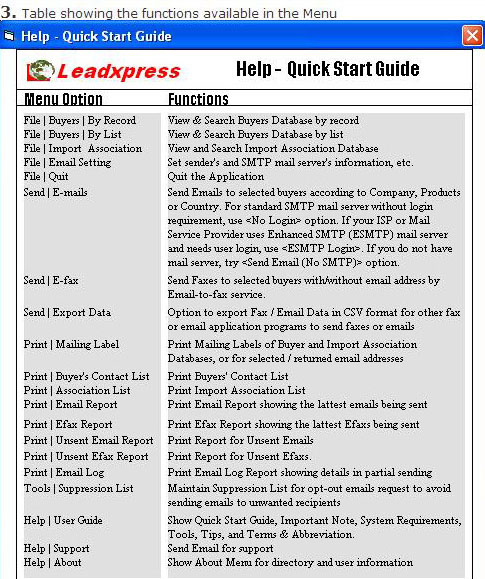
3 Table showing the functions available in the Menu Explanation
Pull-down Menu Description
File | Buyer | by Record View & Search Buyers Database by record
File | Buyer | by List View & Search Buyers Database by list
File | Import Association View & Search Import Association Database
File | Email Setting Set sender's and SMTP mail server's information, etc.
File | Quit Quit the Application
Send | E-mail
 
Send Emails to selected buyers according to Company, Products, or Country. It supports standard SMTP mail server, ESMTP (Enhanced SMTP) server's POP3 and AUTH Login, sending tested email, multiple subject lines, partial sending, pause and resume for 5-20 sec., mail-merge of company & contact, and adding random generated code as email id or mail reference
Send | E-fax Send faxes to selected buyers with/without email address by email-to-fax service
Send | Export Fax List Option to export data in CSV format which is accepted by most fax application programs' phonebook to send faxes
Print | Mailing Label Print Mailing labels of buyers and importers' organizations
Print | Buyer List Print Buyer List
Print | Association List Print Importers' Organization List
Print | Email Report Print Email Report showing lattest emails being sent for subsequent follow-up
Print | Efax Report Print Efax Report showing lattest emails being sent for subsequent follow-up
Print | Unsent Email Report  Print Report for unsent emails
Print | Unsent Efax Report Print Report for unsent efaxs
Print | Email Log Print Email log report
Tools | Block List | Add Email Build the block list for the email recipients' removal request. The email addresses added in this list will not be sent.
Tools | Block List | Remove Email Remove an email address from the block list if an email address is accidently added in the block list
Tools | Uninstall CD Delete some files of the directory
Help | User Guide Show Quick Start Guide, Important Note, System Requirements, Tools, Tips, and Terms & Abbreviation
Help | Support Send Email for support
Help | About Show About Menu for directory and user information
List the detail functions available in the pull-down menu under the <Global Buyer Directory - Menu> screen.
 
  Previous   Next


Copyright © 2002 Leadxpress.com All Rights Reserved

This Site is best viewed by Microsoft IE 5.5 or latter (at 800 x 600).