|
| 

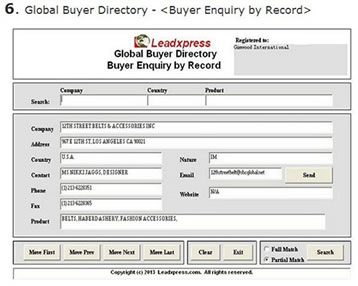
On the (Buyer Enquiry by Record) screen, you may use Company Name, Country, and/or Product name to search buyers or importers. The result will return buyer's company name, address, country, contact person, phone no, fax no, nature of business, email address, website address, and the products, etc. and is display on screen one by one.
It supports (Full Match) or (Partial Match) of the searching criteria. For example, you may enter the full product name such as "Artificial Flowers & Plants" and select (Full Match) when you need to search for buyers' records exactly matching the searching phrase "Artificial Flowers & Plants". If you check (Partial Match) and use "Flower & Plants" as your keyword and search phrase, the program will return all records including artificial and fresh flowers & plants.
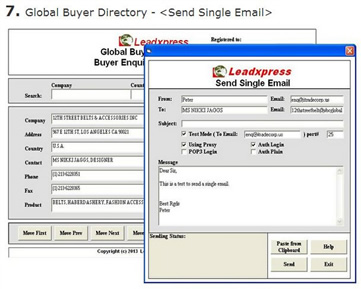
On the (Buyer Enquiry by Record) screen, you may press (Send) to activate the (Send Single Email) screen so that you may send an email message to this individual buyer.
You may directly type your email message on the "Message" field, or create your message by word processing program or text editor such as Wordpad or Ms Word and then copy the content onto the "Message" field by using (Paste from Clipboard) function. Besides, you may send a tested email to your designated email account for testing when your check (Test Mode).